Quote Builder
Create detailed quotes with itemized services and send them to customers.
A quote is a proposal, not a promise — it holds a customer's pricing and scope until they say yes. Quote Builder itemizes the work, tracks the response, and keeps a shareable link the customer can act on without ever needing an account.
Who this is for
What it does
- Builds a quote for an existing customer or a brand-new lead from the same form — a lead never needs its own customer record unless the quote is accepted.
- Itemizes each line with quantity, rate, and a per-line taxable toggle; the amount and the tax total compute automatically.
- Generates a unique, shareable link for every quote, so a customer can review and respond without logging in.
- Locks the tax rate and starts a validity window the moment you finalize — a later change to your business tax rate never rewrites a quote a customer already saw.
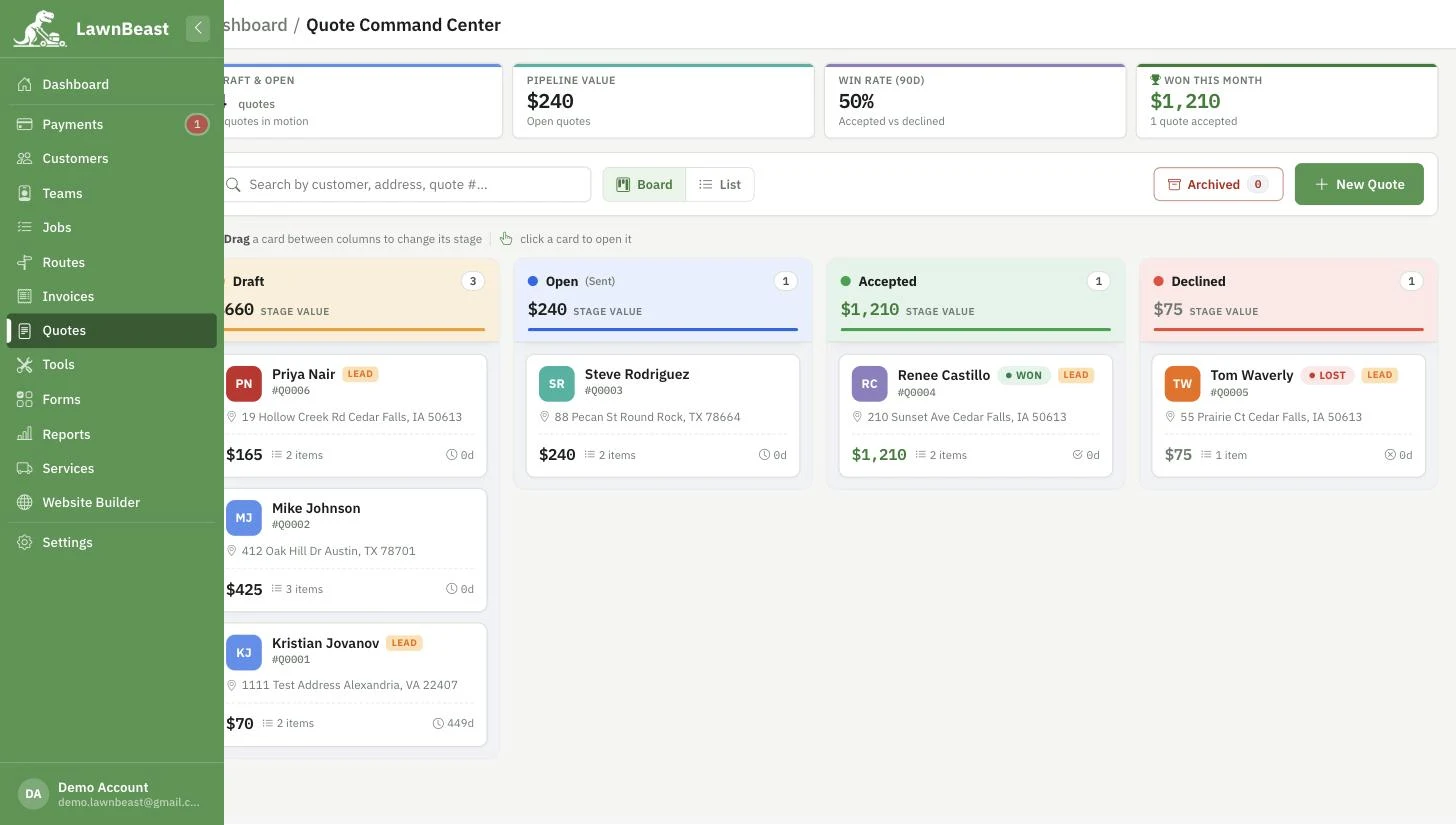
- Tracks every quote through a status board — Draft, Open, Accepted, Declined — with drag-and-drop and a live pipeline value.
- Lets the customer accept or decline from the same link, or from their own logged-in portal, without you having to record the outcome for them.
- Applies one action to several quotes at once — send, mark accepted, mark declined, archive, or delete — from the board's bulk-actions bar.
Archiving a quote is a separate switch from its status — an archived quote keeps whatever status it had (Draft, Open, Accepted, or Declined) and freezes everything except Unarchive, Print, and Delete.
What you get out of it
Common questions
Can I convert an accepted quote straight into a scheduled job?
Not yet — the "Convert to Job" button on an accepted quote is a coming-soon placeholder today. For now, use the quote's itemized details to create the job yourself.
Does a quote for a new lead create a customer record right away?
No. A lead quote holds the contact and address details on the quote itself until the work is accepted; nothing is added to your customer list just for sending a quote.
What happens to the tax rate if I change it after a quote goes out?
Nothing, on quotes that have already left Draft. The rate is locked the moment a quote is finalized to Open, so it stays exactly what the customer was shown. Only quotes still in Draft read your current rate live.
Can a customer accept or decline a quote without creating an account?
Yes. Every quote gets its own link that works without logging in. A customer who already has a portal account can also respond from their own Quotes list.
If I archive a quote, does that count as declining it?
No. Archiving just hides a quote from the day-to-day board — it keeps whatever status it already had. A Draft you archive is still a Draft underneath; you just have to unarchive it to see or act on it again.
Is Quote Builder locked to a paid plan?
No — it's included on every plan.
Ready to get started?
Create detailed quotes with itemized services and send them to customers.