Set your dispatch depot
Tell LawnBeast where your crews load up in the morning, so every route starts and ends there instead of falling back to a crew or business address.
This is optional. If you skip it, routes still work — they just start and finish at your crew's address, or your business address if the crew has none.
1Set your depot
-
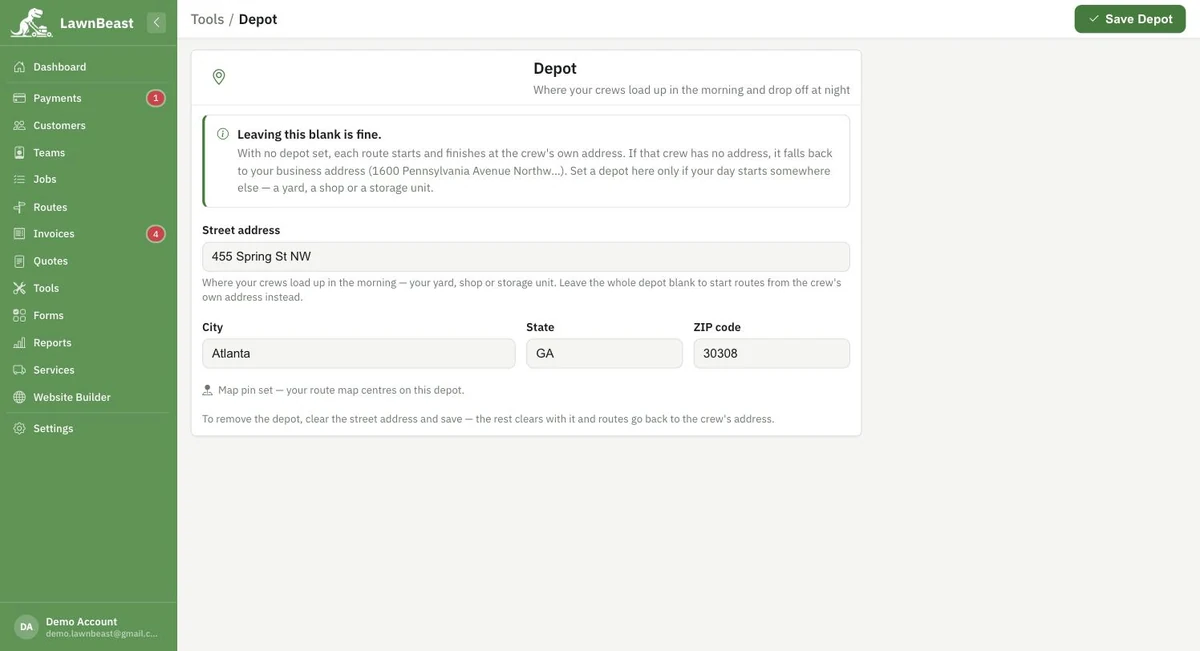
From Tools, open Depot.
-
Fill in Street address — "where your crews load up in the morning, your yard, shop or storage unit." City, State and ZIP code follow it. As you type, Google Places can suggest and pin the address for you; if you type one manually instead, it's geocoded automatically when you save.
-
Click Save Depot, in the header.
Every route checks, in order: a start/finish typed directly on that route, then the crew's own address, then this depot, then your business address. Set a depot only if your day starts somewhere none of those already covers.
Removing a depot
Clear the Street address field and save — city, state, ZIP and the map pin all clear with it, and routes go back to using the crew's address.
How to check it worked
The page itself confirms it: once an address has a pin, the page reads "Map pin set — your route map centres on this depot." instead of "No map pin yet." Build a route afterward and its start/finish point should be your depot instead of a crew or business address.
Reference
| Rung | Source | Checked when |
|---|---|---|
| 1 | The route's own start/finish | Always checked first — a per-route override from the Day view |
| 2 | The filtered crew's address | If the route has no override and a single crew is selected |
| 3 | This depot | If neither of the above is set |
| 4 | Your business address | If nothing above is set |