Route Optimization
Sequence stops to cut drive time and fuel costs.
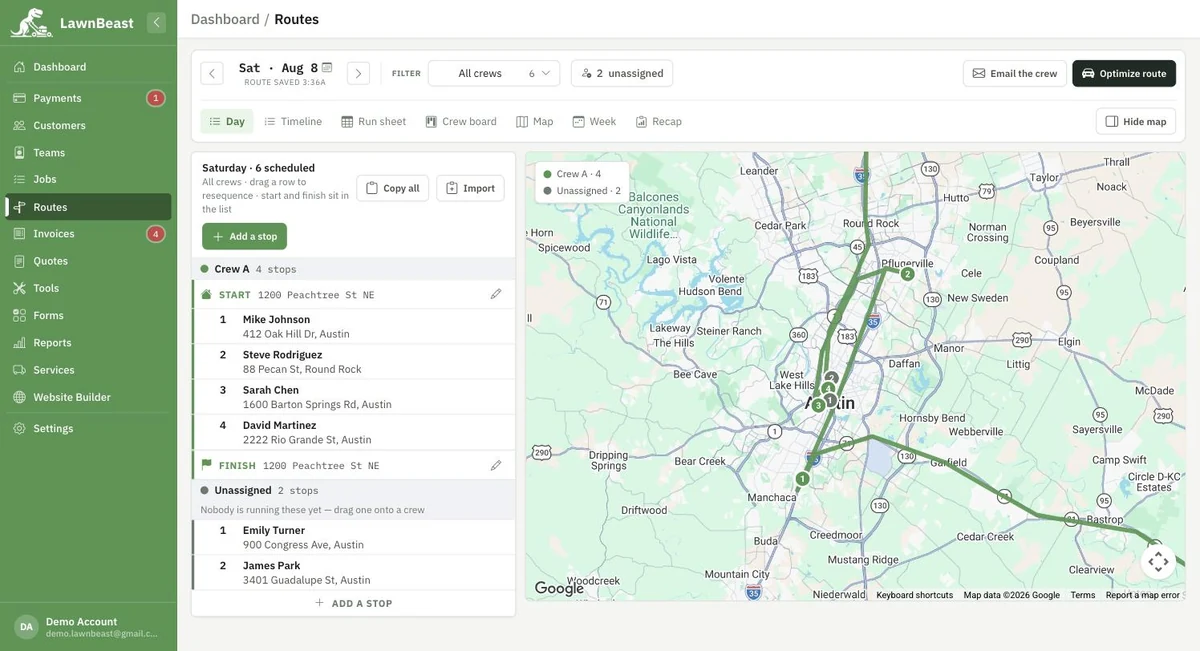
A dispatch console that builds today's route from your scheduled jobs, resequences it with one click, and hands the finished plan to your crews — each one getting only its own stops, by email, the moment you publish.
Who this is for
What it does
- Builds the day's route from your schedule. One click syncs every job scheduled for the day into an ordered route — click it twice and you still have one route, not two.
- Optimizes stop order. Resequences the day for the shortest drive using Google's driving directions, without ever moving a stop you've pinned in place.
- Seven ways to work the same day. Day (an editable list), Timeline (itinerary + map), Run sheet (printable), Crew board (drag stops between crews), Map, Week (a seven-day load view), and Recap (how the day actually went).
- Reassigns stops between crews. Drag a stop to another crew on the board and it moves — on both crews' routes at once.
- Publishes the plan to your crews. Each crew gets its own emailed schedule, not everyone else's stops too. No SMS — every notification is an email.
- Starts from a depot you set, or falls back automatically. A route's start/finish comes from the route itself, then the crew's address, then your depot setting, then your business address — whichever is set first.
- Takes a pasted list of addresses. Paste a block of addresses and it matches them against your customers, adding anything unmatched as its own stop.
What you get out of it
Common questions
Do I need a paid plan to use routing?
No. There's no plan gate anywhere in the dispatch console — building, optimizing and publishing routes is available on every plan.
What happens if I click "Build" more than once?
Nothing extra. Building a route from the day's jobs is idempotent — clicking it again re-syncs the same route instead of creating a duplicate.
Where does a route actually start and end?
Whichever of these is set, checked in order: a start/finish you typed on that route directly, then the crew's own address, then your depot setting, then your business address. See Set your dispatch depot to set one explicitly.
How does my crew actually see their route?
By email. There's no in-app route view for crew accounts — publishing a route or sending a one-off notification both email the crew their stops. There's no SMS option.
Can I move a stop to a different day?
Yes, from the Day view — it reschedules the job and re-syncs both days' routes. The one thing it refuses is moving a stop whose job has already started.
Does the optimizer use real driving directions, or straight-line distance?
Real driving directions from Google, computed in the order LawnBeast's own optimizer decides — Google draws the route, it doesn't choose the stop order.
Can I re-publish after making a change?
Yes — publishing again re-sends the updated schedule to each affected crew. The one thing publish refuses is a route with no stops on it yet.