iOS Mobile App
Manage your lawn care business from your iPhone with the native iOS app.
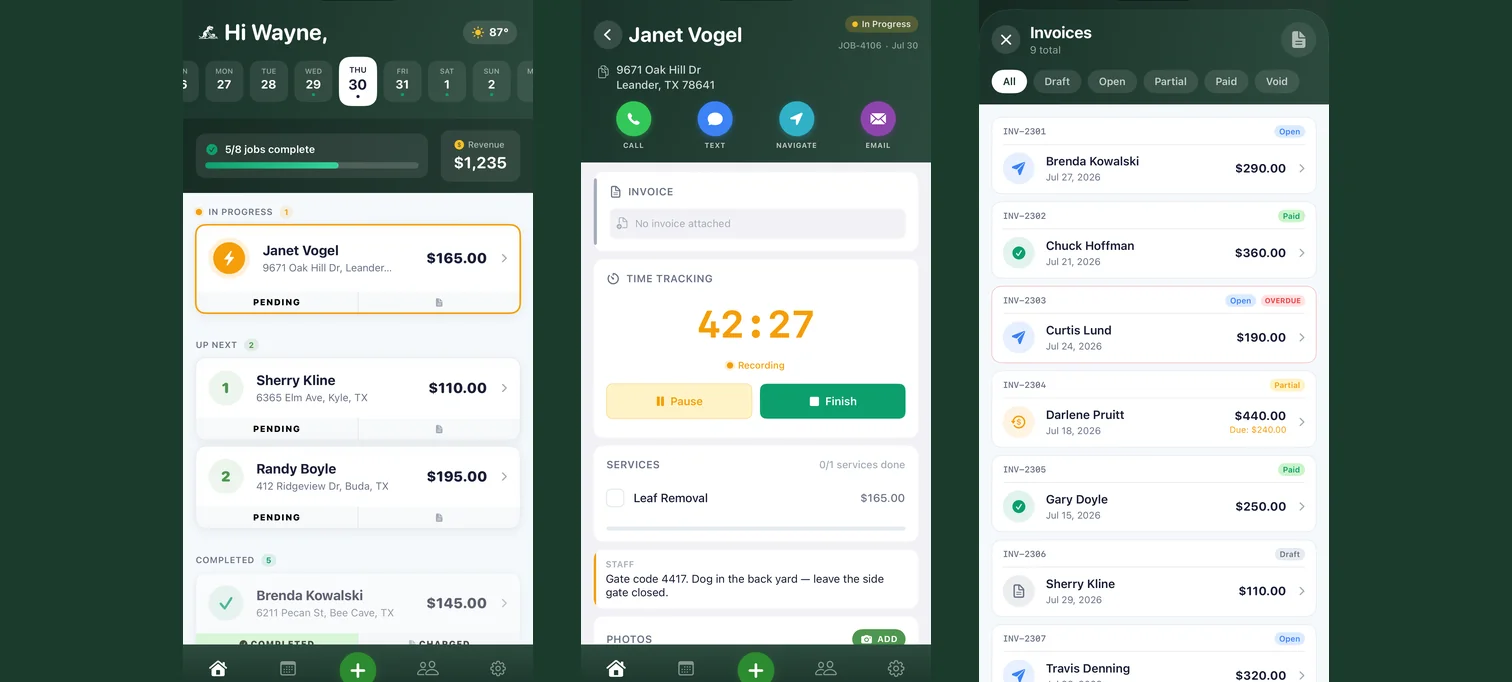
Everything you'd do at a desk — today's schedule, an active job, a customer's invoice — works the same from your pocket, on the same account, kept in sync with the web app.
Who this is for
What it does
- Shows today's schedule and active jobs. The home screen opens on what's due and what's already in progress, pulled live from your account.
- Tracks when a job starts and finishes. Marking a job in progress or complete timestamps it automatically.
- Captures before/after job photos. Add photos from the camera or your library, filed straight into the right gallery category.
- Finds a customer or starts something new. Search your customer list, or start a new job, customer, quote, or invoice without going back to a desk.
- Handles invoices and quotes. View status, finalize, email, and record a payment, all from the job or customer it belongs to.
- Prices a job on the spot. The same pricing calculator, built into the app.
- Signs you in with the account you already have. Credentials are stored in the device Keychain, and the app refreshes your session in the background — no separate mobile password to manage.
Built natively in SwiftUI for iPhone — not a wrapped version of the website. It's currently iPhone only, and requires iOS 18 or later.
What you get out of it
Common questions
Is this the same account I use on lawnbeast.com?
Yes. Log in with the email and password you already use on the website — there's no separate sign-up inside the app.
Can my crew log in too?
Yes. Team members log in with the account you create for them on the website; they can't create their own account from the app.
Can my customers use the app?
No. The app is for contractors and their crews only — a customer login is rejected. Your customers get their own self-service customer portal on the web instead.
Where do I download it?
On the App Store — search for LawnBeast or open the listing on your iPhone, install it, and sign in with the account you already have. The install guide walks through it, including what to do if you were on the TestFlight beta. There's also the App Store announcement.
Does it work on iPad?
Not currently — the app is built for iPhone only.
What iOS version do I need?
iOS 18 or later.
I forgot my password — what do I do?
If you're the contractor, reset it on lawnbeast.com the same way you would for the website. If you're a team member, you can't self-reset — ask the contractor who set up your account to reset it for you.
Can I delete my account from the app?
Contractors can delete their account directly from the app's Account tab. Team member accounts are managed by the contractor who created them, so a team member should contact that contractor instead.
Ready to get started?
Manage your lawn care business from your iPhone with the native iOS app.