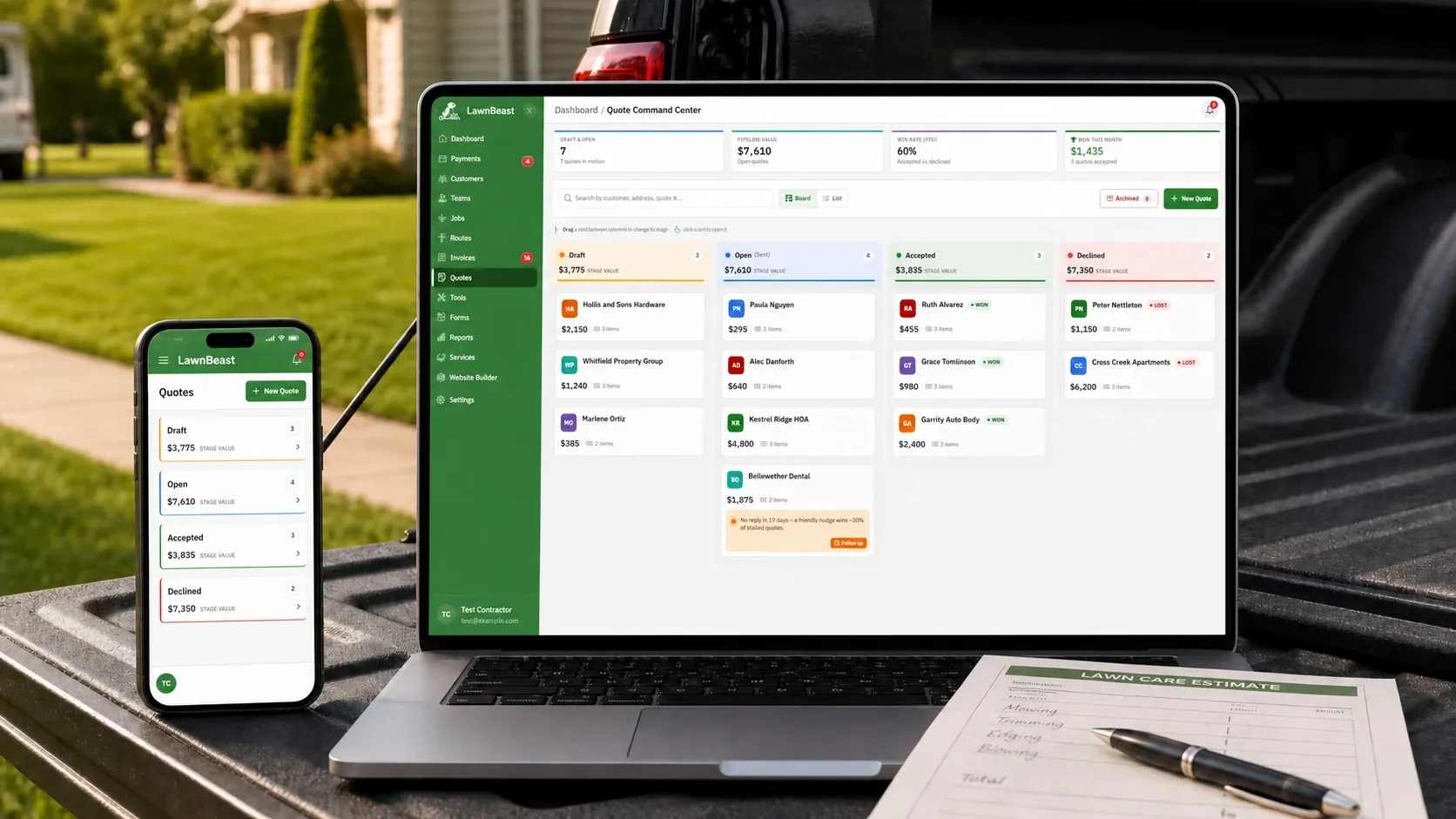
We rebuilt quoting in LawnBeast from the ground up. The old quote list is gone, and in its place is the Quote Command Center — a board where every quote sits in one of four columns you drag cards between, line items that finally do quantity × rate with tax set per line, four pipeline numbers that move the instant you drop a card, and a builder that works on a phone in a driveway. It's live now.
01The Quote Command Center
Every quote sits in one of exactly four columns — Draft, Open (sent), Accepted, Declined. There are no other statuses to learn. Each column header shows how many quotes are in it and what they add up to, pre-tax, so you can see your week at a glance.
- Drag a card to a new column and the status changes. Draft → Open asks you to confirm, because that step locks the tax rate and stamps an expiry date.
- Moves that don't make sense are refused by the server, not just hidden. Accepted and Declined are sticky.
- A search box filters as you type by customer, address or quote number.
- There are two views of the same quotes. The condensed list is the default; the drag-and-drop board needs a window at least 1200px wide, so on a phone you get the list. It remembers whichever you picked in that browser — on the device, not on your account.
02Line items now do quantity × rate, with tax set per line
The old builder had one price per line, no quantity and no per-line tax. Now every line carries its own quantity, rate, and a taxable / non-taxable toggle. The line total is quantity × rate, worked out for you, and the subtotal, tax and total update live as you type. A service catalog picker drops in a pre-priced line from the services you've saved — quick-add chips on desktop, a full-screen picker on a phone.
The tax rate is frozen when a quote leaves Draft, which is the same action as sending it. Change your business tax rate next season and a quote you already sent doesn't get quietly rewritten. Pull one back to Draft and the lock clears; finalizing it again re-locks at whatever your rate is then.
03Four numbers that move when you move a card
They update the moment you drop a card. No refresh. Here's exactly what each one counts.
| Tile | What it counts |
|---|---|
| Draft & Open | Non-archived quotes sitting in Draft or Open. |
| Pipeline Value | Total value of Open quotes only, pre-tax. Drafts don't count. |
| Win Rate (90d) | Accepted divided by accepted plus declined, last 90 days, whole percent. Reads 0% until something is decided. |
| Won This Month | Quotes accepted in the current calendar month, in your own timezone. |
04Quotes that go quiet flag themselves
An Open quote with no reply 14 days after it was created gets a badge on its own card reading "No reply in N days", with a "Follow up" link that opens the quote. To be exact about what that is: LawnBeast doesn't email or text your customer, and it doesn't email you. It's a flag on your board, so the ones going cold are the ones you notice. The follow-up is still a phone call you make.
05Bulk actions, and an archive that leaves your win rate alone
Select up to 100 quotes at once and Send, Mark Accepted, Mark Declined, Archive or Delete them. Archiving moves a quote off the board into an archived drawer with its history and status intact. Unarchiving is one quote at a time — there's no bulk undo for it.
Archived quotes still count toward Win Rate (90d) and Won This Month. An outcome is a historical fact, so tidying your board never changes your stats. They do drop out of Draft & Open and Pipeline Value, which only count non-archived quotes.
06On a phone, the builder is a four-step wizard
Under 768px the builder becomes four steps: "Who's it for?", "What's the work?", "Schedule & details", "Review & create". Step two uses tap-to-edit tiles with a bottom-sheet editor, so you can price a job standing in the customer's yard. What the phone gives you is the builder and the list, not the board.
07A new page for your customer to accept or decline
The page your customer lands on from the emailed link was redesigned, and one thing on it was fixed. An answer used to be recorded straight from following the link, so a scanner on their mail server could silently record an accept or decline they never made. Now they press a button on the page.