Invoice Builder
Create professional invoices with line items, taxes, and custom memos.
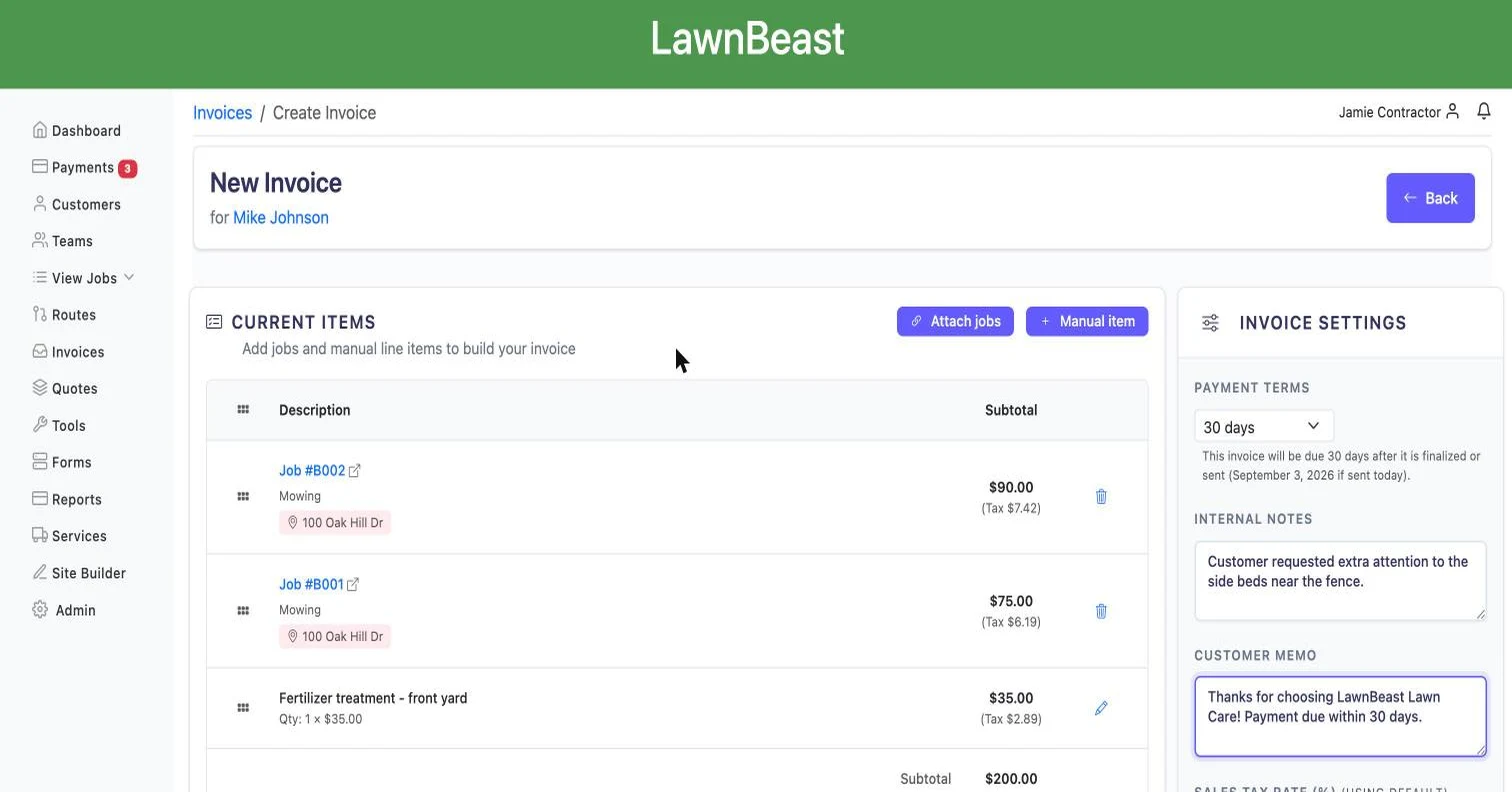
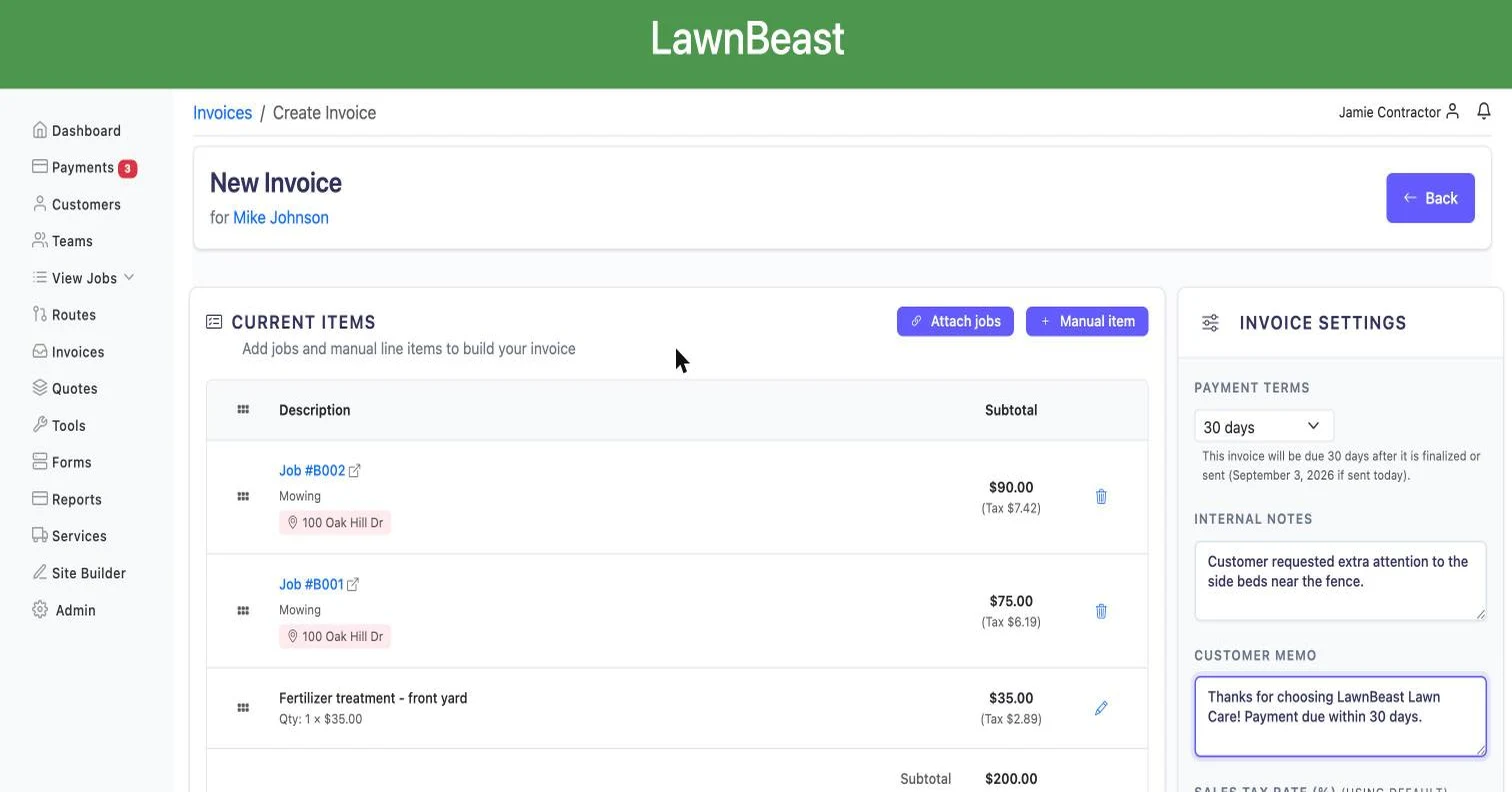
Build an invoice the way the job actually happened — pull in completed jobs, add anything that isn't on a job, set your tax and terms, and send it, all from one screen that saves as you go.
Who this is for
What it does
- Attaches eligible jobs in bulk. The "Attach jobs" modal lists every job billed by invoice that isn't cancelled and isn't already on another invoice, with a running total of what's selected.
- Adds manual line items. Description, quantity, unit price, and a per-item taxable toggle — for anything that didn't come from a job.
- Reorders line items by drag-and-drop so the invoice reads in the order you want, not the order things were added.
- Sets payment terms and due date — Today, Tomorrow, 7/14/30/60/90 days, or a custom date.
- Overrides sales tax per invoice when a job needs a different rate than your account default.
- Separates internal notes from the customer memo — one stays on your side, the other prints on the document the customer sees.
- Saves automatically as you attach jobs, add items, or change settings — there's no separate Save button to remember.
The builder only opens a draft invoice for editing. Once an invoice is finalized and sent, changes go through status actions on the invoice detail page instead.
Billing the same customer on a repeating schedule? Automatic Invoicing generates and sends these without you opening the builder each time. What the customer sees on the document itself — logo, license lines, layout — is controlled separately by Invoice Branding.
What you get out of it
Common questions
Can I invoice something that was never scheduled as a job?
Yes. Add a manual line item with its own description, quantity, and unit price instead of attaching a job.
Why doesn't a job show up in the "Attach jobs" list?
A job only appears if it's billed by invoice (not by card), isn't cancelled, and isn't already attached to another invoice. Any one of those disqualifies it.
Can I edit an invoice after it's been sent?
Not through this builder — it only opens invoices that are still in draft status. Once an invoice is finalized, you change it through the status actions on the invoice's own page instead.
Do I need to click Save?
No. Attaching a job, adding a manual item, or changing a setting in the sidebar saves automatically — the header shows a brief "Saving…" then "Saved".
Does tax apply automatically?
It uses your account's default sales tax rate unless you set a different rate for that one invoice. Manual line items also have their own taxable on/off toggle.
What's the difference between the internal notes and the memo?
Internal notes are for your team only and never appear on the invoice the customer sees. The memo is the customer-visible field — it prints on the document.
Can I charge a tip on an invoice?
Yes — each invoice can follow your account's default tipping setting or override it. Turn tipping on account-wide from Customer Tipping.
What happens if a customer doesn't pay?
Invoice Reminders can follow up automatically, and the AR Aging Report shows every unpaid invoice across your whole book, grouped by how overdue it is.
Ready to get started?
Create professional invoices with line items, taxes, and custom memos.