Your logo and your license number now print on every document

Invoices, quotes and receipts can now carry your company logo, your license or registration number, your tax ID and your own footer terms — set on one page with a live preview of all three documents.
July 24, 2026 4 min read
Your logo and your license number now print on every document

Your invoices, quotes and receipts can now carry your company logo, your license or registration number, your tax ID and your own footer terms. It's all set on one page, with a live preview of all three documents beside it — and the same release fixed a bug that was putting contractors' internal notes on customer invoices.

01One page for everything customers read

There's a new Branding & Logo entry under Tools. It groups settings by where they show up rather than by what kind of data they are: the logo, the license line, the tax ID and the footer terms all exist for one reason, which is to appear on the paperwork you send.

They were briefly scattered through Business Settings, alongside tax rules and cancellation policies, where none of them was findable. Now they're together, with a preview showing exactly what they do.

The Branding and Documents page: a Logo card and a Document Style card on the left, with a live invoice preview on the right
Settings on the left, your actual document on the right, redrawing as you type. Screenshots throughout use a demo account.

02What you can put on them

  • Your logo. A PNG, JPG, GIF or WebP up to 5MB. We re-encode it, scale it to a consistent size and strip camera metadata, so an oversized export from a designer works without you resizing anything first.
  • A license or registration line. Both the number and the wording in front of it. It starts as "License #", but states don't agree on terminology, so you write your own — "Registration #", "Applicator #", whatever your regulator expects.
  • A business tax ID or EIN. Off unless you switch it on. Commercial clients frequently need one on the invoice before accounts payable will process it.
  • Footer terms. A free-text line at the foot of every document — payment terms, a late-fee note, a thank-you. There's no switch to remember: leave it blank and nothing prints.

The license and tax switches apply across invoices, quotes and receipts together rather than per document. A compliance line that shows on some of your paperwork and not the rest is worse than one that's consistently there.

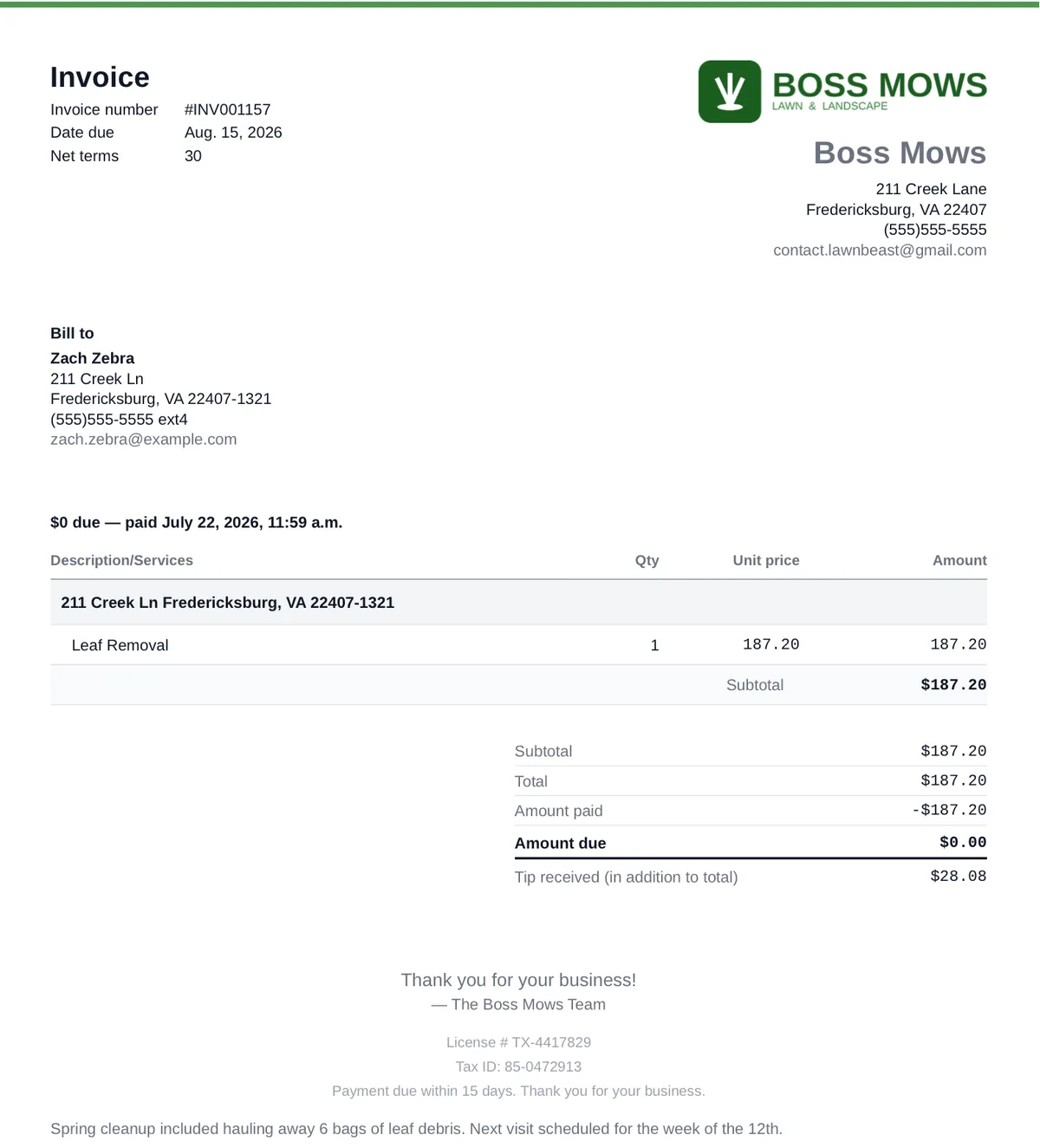
A finished invoice PDF with the contractor's logo at the top and a license number and payment terms printed at the foot
The result on a real invoice PDF — logo at the top, license line and terms at the foot.

03A logo that actually shows up in email

Most mail clients block remote images by default, which is how a logo linked from a server ends up as a grey box in the recipient's inbox. Yours is sent inside the message itself instead, on every invoice, quote and receipt email LawnBeast sends on your behalf — so it renders without your customer having to allow anything.

And if a logo ever fails to load on our side, the email still goes out, just without it. A branding problem never stops an invoice reaching a customer.

04Fixed: internal notes were reaching customers

An invoice in LawnBeast has two note fields. One is a memo meant for the customer. The other is labelled "Internal notes (not visible to customers)" and is meant for you.

The invoice PDF was rendering the wrong one. Notes written on the understanding that they were private were printing on the PDF sent to customers.

That's fixed. The PDF now renders the customer-visible memo, and whether even that appears is controlled by a switch on the new branding page. If you've written internal notes on invoices in the past, they're no longer going anywhere — and if you'd like to check what a given invoice looks like to a customer, downloading its PDF shows you exactly that.

Put your logo on it

Read the branding guide
Under Tools → Branding & Logo. More on what it covers: Invoice Branding.