Routes, Rebuilt Into a Dispatch Console
The Routes page is now a seven-mode dispatch console with an optimizer that respects your pins, and a publish step that previews each crew's email before anything sends.
The Routes page was rebuilt from a single map into a full dispatch console: seven ways to work the same day, a route optimizer that respects the stops you've pinned, and a publish step that emails each crew only its own stops — previewed before anything goes out.
01One map becomes a console
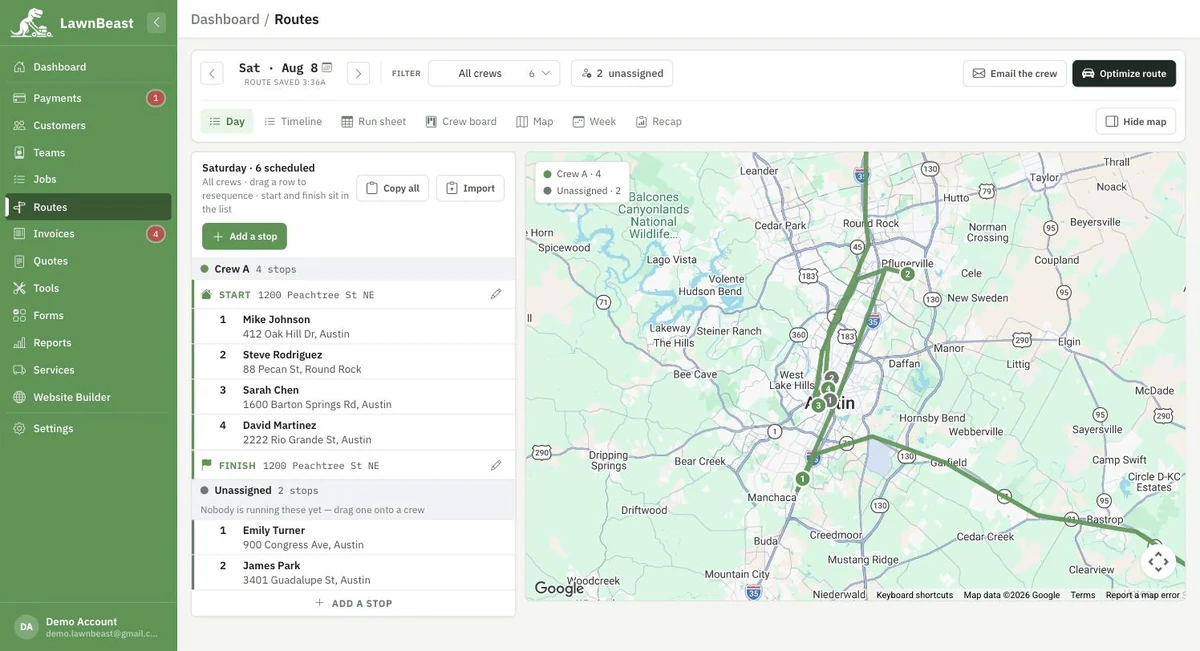
The old Routes page was one map with a start address, an end address, and a list of stops. In its place is a dispatch console with seven view modes: Day (an editable list), Timeline (itinerary plus map), Run sheet (printable), Crew board (drag stops between crews), Map, Week (a seven-day load view across every crew), and Recap (how the day actually went). Nothing from the old page was thrown away — routes built under the old system are still there, unchanged.
02Optimize, without losing your pins
A day's route now builds itself from whatever's scheduled, and one press of Optimize route resequences it for the shortest drive. Pin a stop first and the optimizer leaves it exactly where it is — useful for a first-thing appointment or a stop that has to stay last. Building and optimizing are both safe to repeat: neither creates a duplicate route.
03Publish previews before it sends
Sending a route to a crew used to mean nothing more than a toast saying mail had gone out, with no way to see who got what beforehand. Publishing now opens a breakdown first — one card per crew, each with a preview of that crew's actual email — so nothing sends until the dispatcher has seen it. Every crew still only ever receives its own stops. There's no SMS option; every send is email.
04A depot fix worth mentioning
A route's start and finish point falls back through a short list: a start/finish typed on that route, then the assigned crew's own address, then a depot the contractor sets. The original v2 dispatch console stopped there — but the old v1 page had always fallen back one rung further, to the contractor's own business address, for anyone with neither a crew address nor a depot set. That last rung was missing when the console first shipped, which meant a route could silently start from nowhere. It's restored now, matching what the old page always did.
Setting a depot is still optional. Every rung of the fallback works without one — a depot is only for a contractor whose day starts somewhere none of the other three already cover.
See how it works
Setting a dispatch depot is optional — see the depot guide if you want one.